
Block a sender
Open the conversation, tap the sender, then use the Info controls to block the contact. This works best for repeat senders.
Blocking a sender is useful when the same phone number keeps bothering you. It is less effective against spam campaigns that rotate through many numbers while repeating the same message.
Report Junk vs block sender vs filtering
These iPhone tools solve different parts of the problem. Use them together instead of expecting one setting to stop every unwanted message.
- Report Junk helps report an unwanted message when iPhone shows the option.
- Block Sender is best when the same number keeps texting you.
- Filter Unknown Senders separates people outside your contacts.
- Text Message Filtering lets an SMS filter classify unknown messages.
- FingerWag adds rules for recurring phrases and scam categories.
Screen unknown senders in iOS 26
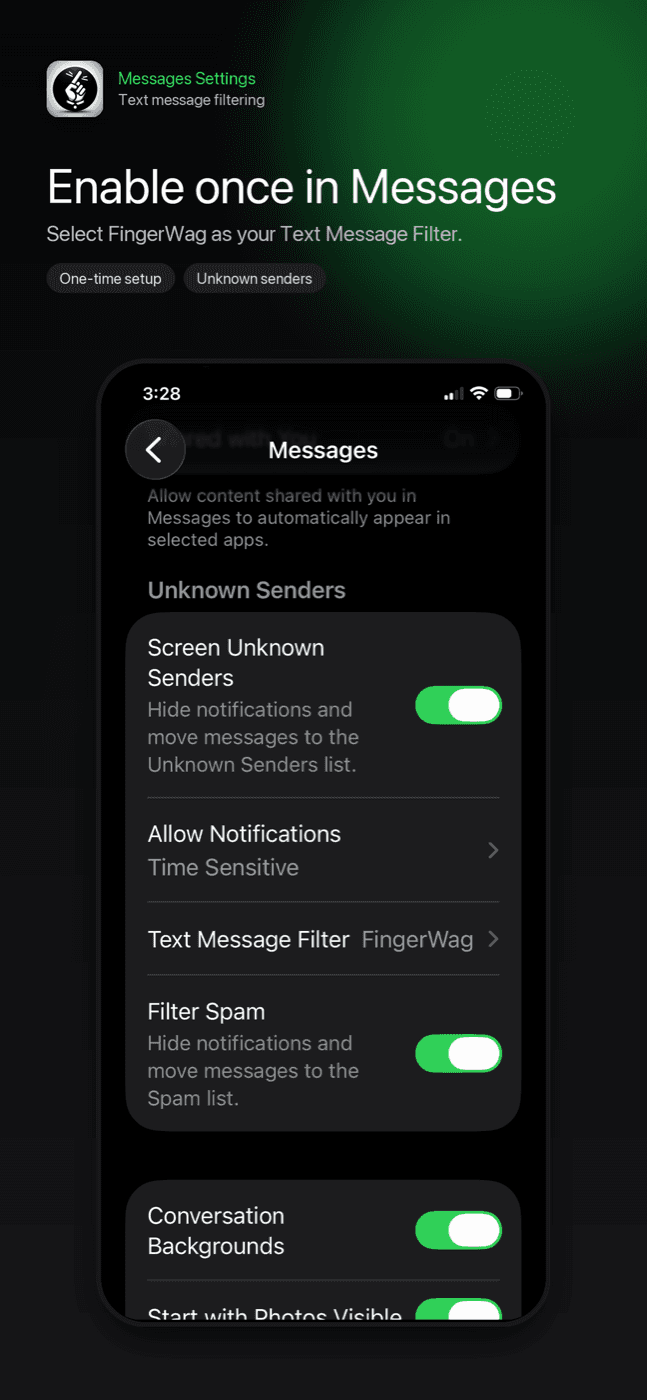
In Messages, tap Filters → Manage Filtering and turn on Screen Unknown Senders. Older iOS versions call this Filter Unknown Senders. This moves unfamiliar conversations to a separate view.
Apple separates messages from people outside your contacts. This can reduce interruptions, but it does not replace a rule-based filter.
Unknown-sender filtering is a good baseline because many spam texts come from numbers you have never contacted. Keep important contacts saved so legitimate conversations are less likely to be treated as unknown.
What Filter Unknown Senders does not do
Filter Unknown Senders is useful, but it is not the same as blocking every spam text. Unknown conversations may still arrive in a separate list, and the setting does not create custom phrase rules. If you want recurring toll, delivery, political, fundraising, or phishing patterns sent away from the main inbox, use Text Message Filtering with a trusted filter.
Enable FingerWag
iOS 26: start in Messages
- Open Messages and tap Filters, then Manage Filtering.
- Turn on Screen Unknown Senders to separate unfamiliar conversations.
- Open Text Message Filter and enable the filtering controls and installed extension you want to use.
These menu names follow Apple’s iOS 26 guide. For FingerWag, install and open the app first, then enable its extension.
If your iPhone shows older menu names
Look in Settings → Apps → Messages for Text Message Filtering. On iOS 17, start at Settings → Messages and look for Unknown & Spam. Select FingerWag in the available SMS-filter list. The app’s setup screen can help you find the controls for your version.
Screening and filtering do not delete messages. Review the filtered folders while setting up rules, and keep wanted senders marked as known. See how to find a missing message.
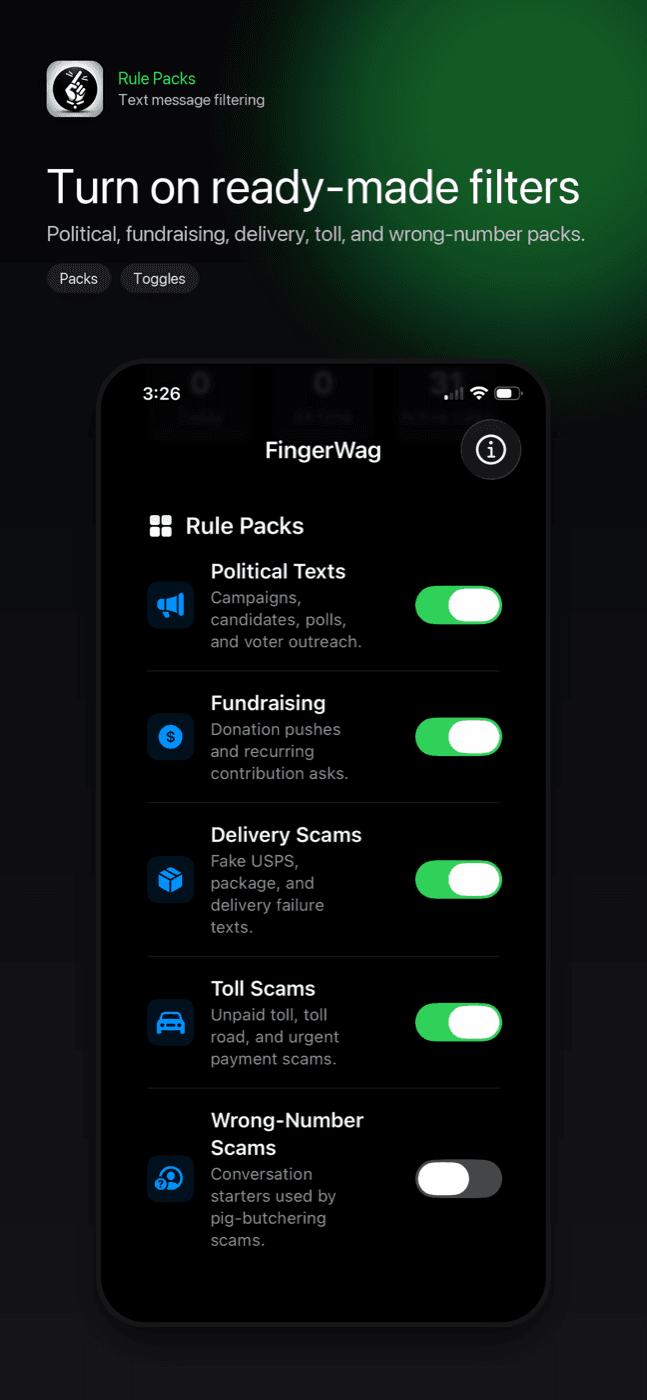
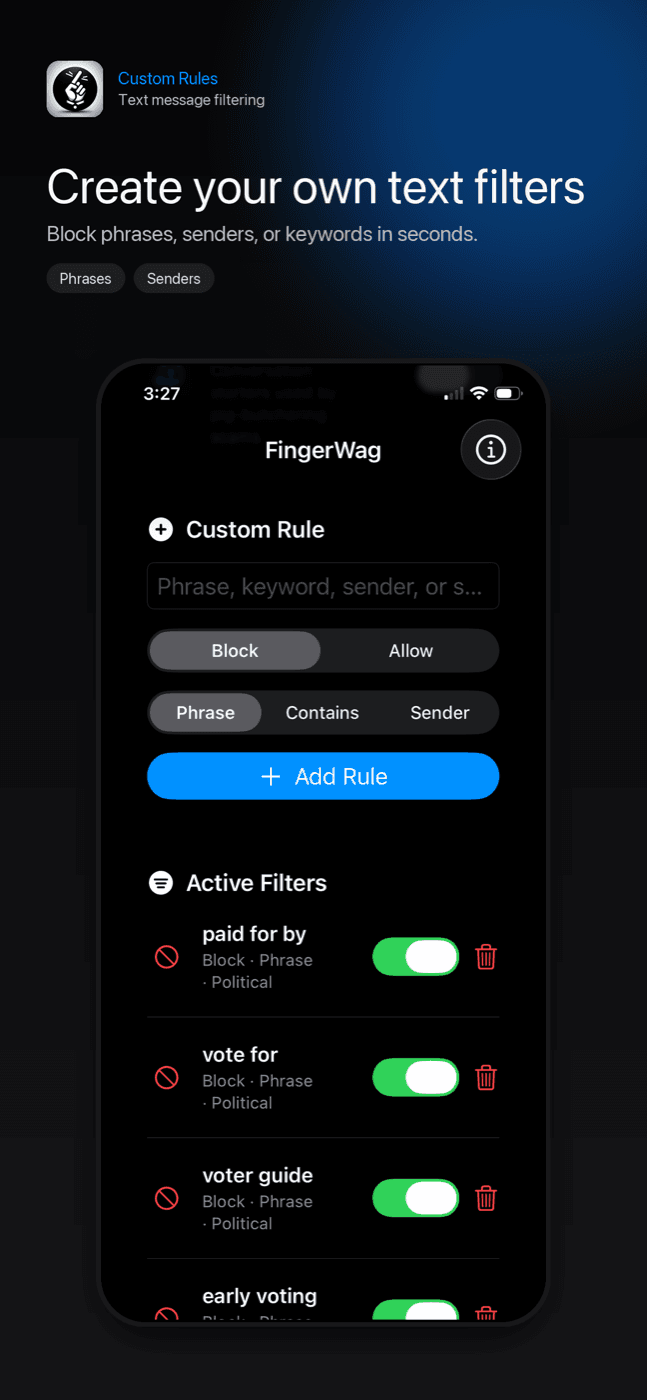
FingerWag setup screens
The app gives you filter packs and custom rules, then iPhone uses the Text Message Filtering setting to route matching unknown-sender messages.
Add rules
Use FingerWag rule packs or add your own phrases. For example, you might filter donation asks, fake delivery notices, survey messages, or campaign disclaimers.
Example rules to start with
- unpaid toll, toll balance, final notice
- package on hold, confirm your address, redelivery fee
- verify your account, fraud alert, suspicious purchase
- donate now, quick survey, paid for by
- short-link or sender fragments that repeat across spam texts
What iPhone can do
- Block a specific sender or number.
- Report some unwanted messages as junk.
- Separate messages from unknown senders.
- Let a third-party filter classify unknown SMS messages.
What FingerWag adds
- Private rule packs for recurring spam and scam patterns.
- Custom phrase, sender, and category rules.
- Political, fundraising, delivery, toll, and phishing filters.
- On-device filtering without uploading message content.
What no iPhone filter can promise
No app can guarantee every unwanted text will be caught. The best approach is layered: avoid suspicious links, report obvious spam, block repeat senders, and filter recurring patterns before they interrupt your main inbox.
Troubleshooting iPhone spam text blocking
- If FingerWag is not enabled as a message filter, iOS will not use it.
- Third-party SMS filters do not filter iMessage. Use Apple’s screening, reporting, or blocking controls for those conversations.
- If the sender is saved in Contacts, the message may not be treated as unknown.
- If a scam changes wording, add a new phrase rule for the new wording.
- If a useful message goes to Junk, make the rule more specific.
Get FingerWag for iPhone
FingerWag helps block spam, scam, and political text patterns with private rules you control.

iPhone spam text questions
Can iPhone block all spam texts automatically?
No. iPhone can block known senders, report junk, filter unknown senders, and use third-party SMS filters, but no setting can guarantee every spam or scam text is stopped.
Where is Text Message Filtering on iPhone?
On iOS 26, open Messages, tap Filters, then Manage Filtering and Text Message Filter. Other versions may show Text Message Filtering in Settings under Apps, Messages, or Unknown & Spam.
Does FingerWag block texts from my contacts?
No. iOS SMS filtering is focused on messages from unknown senders. FingerWag is designed to filter unwanted unknown-sender messages using rules you control.
Should I use Filter Unknown Senders or Text Message Filtering?
Screen Unknown Senders (called Filter Unknown Senders on older versions) separates unfamiliar conversations. Text Message Filter adds classification for eligible messages. Start with screening, then add a filter if you need custom rules.